Introduction
Before we would be able to make use of our GPU, we need to discover it first. We will use DirectX Graphics Infrastructure – or DXGI for short – to do so. On top of that, we will quickly list all monitors attached to each GPU and we will see what our GPU is capable of, for instance how much available memory does it have.
We will take a quick look at the COM paradigm. We will introduce two most important subjects related to COM which are objects and interfaces. We would get familiar with IUnknown interface, which is one common interface for every COM object. We will get to know how to identify COM objects and interfaces, and how to manage its lifetime.
Architecture
Back to the drawing board. In this chapter we will create only one class – the Renderer class. It’s main responsibility would be to handle all the things related to rendering, starting from exploring all available hardware, to scheduling every object we want to draw for the GPU execution.
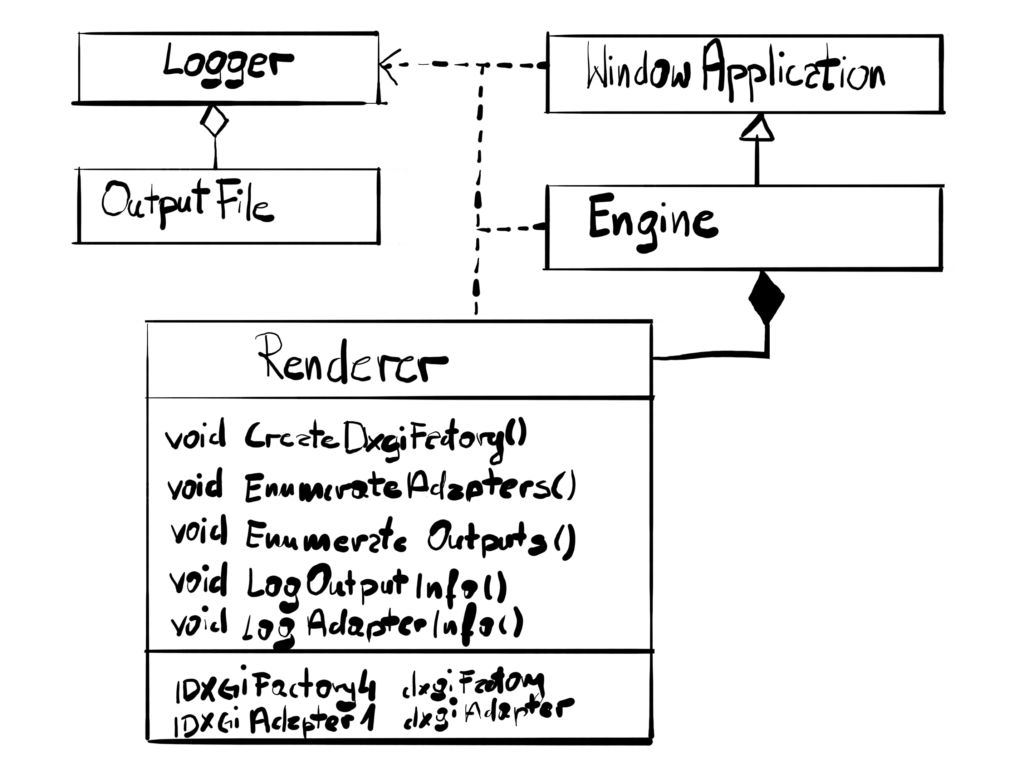
For now, the Renderer class will only contain the functionality related to the hardware discovery. I’ve decided to use the pointer to that class in the Engine class instead of other technique like inheritance, because I would like to have a possibility to switch Renderers at some point, maybe even during runtime.
| In UML, there are two important relationships – the “aggregation” and the “composition”. In both of those relationships one object “owns” and object from another class. The difference is that in the aggregation relationship the object that is own can exist on its own, while in the composition it rather can’t. Aggregation happens between Logger and OutputFile – OutputFile can easily exist without Logger, you can open files like bitmap or something. The composition happens between Engine and Renderer – the Renderer really makes no sense without the engine. |
We will store pointers to COM objects of the DXGI Factory and the DXGI Adapter, which represents the actual GPU that we picked that will be executing our commands. We will need this adapter in the future to create other DXGI objects.
Renderer Class
Let’s take a quick look at the Renderer class that we will be implementing today.
class Renderer
{
public:
  Renderer();
  ~Renderer();
private:
  void CreateDxgiFactory();
  void EnumerateAdapters();
  void EnumerateOutputs(IDXGIAdapter1* currentAdapter);
  void LogOutputInfo(IDXGIOutput* output);
  void LogAdapterInfo(IDXGIAdapter1* adapter);
  IDXGIFactory4* dxgiFactory;
  IDXGIAdapter1* dxgiAdapter;
};
In this chapter we will be managing the internal state of our Renderer – there are no public method available for now, just private ones. We will create this class so that the constructor takes cares of what it suppose to, which is the act of creating and initializing the object.
Renderer::Renderer()
{
  CreateDxgiFactory();
  EnumerateAdapters();
}
Since this is the first time we will be creating some COM objects, we have to remember to release them in the destructor.
Sapphire::Renderer::~Renderer()
{
  SafeRelease(&dxgiAdapter);
  SafeRelease(&dxgiFactory);
}
Now this is not exactly what would you expect. Usually we would call the delete keyword to free the heap, but in this case we are dealing with something a little bit different – the Component Object Model. So please keep this code in mind and read the next section, everything will become more clear.
Component Object Model
At its very core, the Component Object Model is a paradigm that allows applications to be build from binary software components. If this sounds to you a lot like a Dynamically Linked Library, then you are correct – it is a very similar concept. Similarly to DLLs, you can either implement something in as COM or you can simply consume that implementation as an end user. But be ware – even though from surface COM and DLLs are really similar, in really it couldn’t be further away from each other.
Believe it or not, COM is a very complicated subject. There are entire books dedicated to this subject, like “Inside Com” or “Essential COM”. It has the reputation of being difficult to learn and it lives up to that. The good news is that in this course we will only be using COM objects and interfaces, not creating them. We will be the clients, and in such case it is much easier to learn. In fact, one could bet that you could manage just fine with game development without any knowledge about COM.
I tend to agree, but after implementing this engine for a while, a decided that it would be better to know a little about this standard. The sole reason would be that a lot of Windows libraries are exposed to us as COM, DirectX being the biggest example, followed by another big one, DXGI. Therefore, I will introduce couple of basic concepts related to this standard.
COM Paradigm
You can think of COM as a technology, or a standard. It provides solution for problems like class encapsulation, inheritance, data sharing, platform independence and more. If you are familiar with C++ and Object Oriented Programming, those concepts are for sure known to you. What COM does is it takes those concepts and it elevates them to the next level.
Moreover, COM is not bound to any specific programming language. It rather provides a binary standard of its layout, therefore it doesn’t really matter in which language the client uses, unless it does support pointers and function pointers. So COM is a description of the binary data. It all comes with a cost though, because it is much harder to learn and to implement something with it.
There are couple of very important COM paradigms that we should be aware of.
- It is independent of any specific programming language
- It is a binary standard, not a programming language
- It provides a way to dynamically discover interfaces
- It manages its object’s creation and lifetime
- It provides mechanism to uniquely identify its interfaces
- You can’t manipulate COM objects directly
- Instead you manipulate on them only by using one of the interfaces they implement
For our purpose, you can think of COM as something similar to a DLL library, where only pure virtual classes are exposed to the client. Moreover, DirectX uses a little bit simplified COM, so sometimes we don’t have to worry about anything that happens under the hood – we simply call API functions and in return we get pointers to COM interfaces.
COM Classes, Objects and Interfaces
COM object is something totally different than a C++ objects. Conceptually they are similar – is a set of data and set of functions that manipulate that data. However, they are realized in a totally different way. First of all, COM is a binary standard, so that is the difference number one. Big difference number two is that access to COM objects is possible only through one or more interfaces. Interfaces are sets of functions, and those functions are called methods.
As I mentioned before, COM takes a concept of “encapsulation” and elevates it to the next level – you don’t really know what COM object does, what data it holds and how it manipulate that data. Instead, you only know one or more interfaces that it implements. A COM class is a concrete implementation of one or more interfaces.
Ok, so if it is compiled and we know nothing about it – how do we use COM objects? The only way to interact with COM object is via one or more interfaces that it implements. A COM interface is simply a collection of well defined functions. It is a contract between the component that will provide implementation and the rest of the system that clearly defines the function it exposes, its parameters, return value and so on.
COM interface is really similar to pure virtual classes in C++ and again, conceptually it is. COM took a concept of the “interface” and elevated it to the next level. From a technical point of view, COM interface is really an array of pointers to functions that implement its exposed, well defined functions.
If we would like to use COM component in our code – and we will, a lot – what we are given is a pointer to the COM interface, which really is an array of pointers that point to specific COM component methods implementing them. This is how COM implements the “inheritance” in its own, elevated way. Note that the same COM object can implement many such interfaces. What we get as users of such COM library are pointers to those interface’s virtual tables.
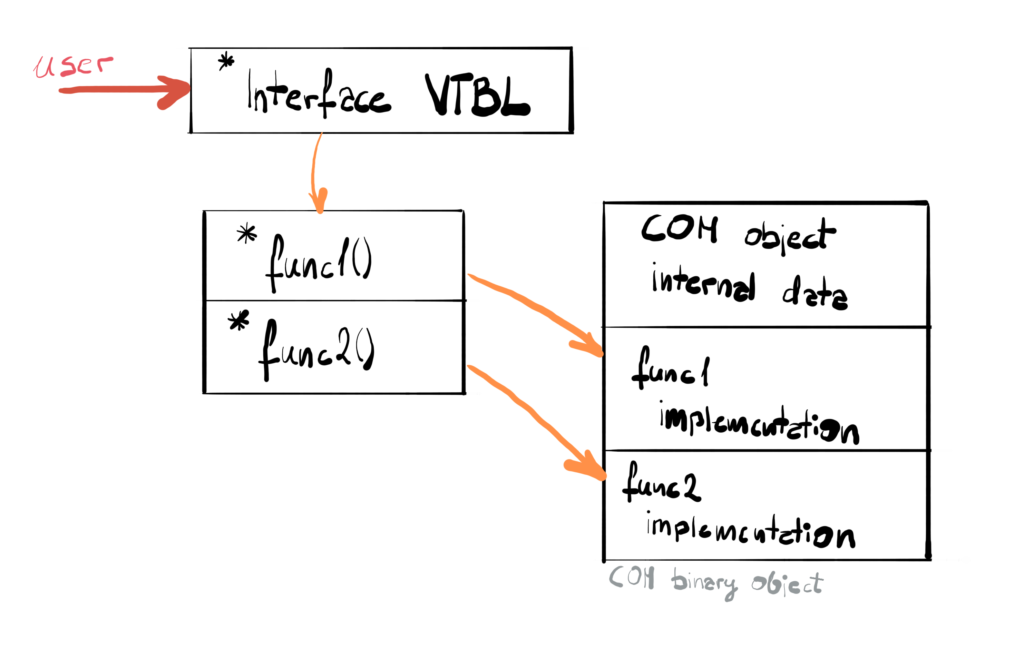
There is one more basic idea that we need to clarify. Since we don’t know much about COM object internals, how do we identify a specific interface that we want to target? Every COM interface and COM component class can be identified with GUID (Globally Unique Identifier). GUID are actually unique numbers which are treaded as IDs. They are referred to as UUID (Universally Unique IDs) and they are actually defined by the external organization. If that wasn’t enough, the GUIDs are divided into CLSIDs for component classes and IIDs for interfaces. This ID lets us uniquely identify each COM interface and each COM object.
COM Object Lifetime Management
COM objects are responsible for their own memory allocations. That means that you don’t have to worry about it. They do it by so-called reference counting. Each COM objects implements (note how I didn’t use the word “inherit”) the IUnkown interface. This interface contains three functions, AddRef(), Release() and QueryInterface(). The first one increments given object’s reference count, while Release() decrements it.
When you create COM object it increments its reference count. If you are done with given COM object, you call the second function which decreases that counter. If this counter hits zero, that means that no other object is referencing it, so it deletes itself. The program never explicitly deletes the object. So you don’t have to care about the creation and destruction of those objects, it is all done for you. We only have to worry about increasing and decreasing the counter when necessary.
The self-contained COM object lifetime management also determines the way we create them. We don’t use the new and delete operators. Instead, there is an entire procedure you need to follow when you want to create COM object, including involving the CoCreateInstance() function. We’re not going to see this here however, because D3D uses “lightweight COM”. The COM objects are created for us, we only have to call proper DirectX API function and in return we retrieve a pointer to the interface.
One thing I’ve added in the codebase is the function SafeRelease (taken from Microsoft samples here) that will allow us to safely release the COM object. Whenever you create COM object, its reference counter is incremented for you, but you are responsible for calling the Release() function when it is no longer needed. This helper function helps with that. First we check if the pointer is not null, then we call the Release() and to be sure that we never accidently use that pointer again, we set it to null as well.
template <class T>
void SafeRelease(T** comObjectAddresssOf)
{
  if (comObjectAddresssOf)
  {
    (comObjectAddresssOf)->Release();
    *comObjectAddresssOf = NULL;
  }
}
| Template functions can operate on the generic type. This is a way to create generic functions that can accept arguments of the same type and yet provide the same functionality. The “T” is so called the template parameter and allows to provide the actual type that will be used. |
We call this function in the destructor of the Renderer class, because that is when we know for sure that we no longer need those. We could discard those objects earlier, but for the sake of simplicity we will keep them as long as we keep Renderer instance.
DirectX Graphic Infrastructure
DXGI is a low-level layer to handle tasks that are really independent from the DirectX version that you are using. It was introduced with DirectX 10 and is still alive and well with DirectX 12. It can be used by the user directly or by the DirectX runtime. Its main tasks are among others hardware enumeration and discovery, presenting frames on the monitor and managing full-screen transitions.
The user can directly use DXGI to discover available hardware like GPUs or monitors attached to them. DirectX runtime on the other hand uses it for low-level tasks, like submitting command buffers for the GPU execution. On top of that, DXGI is crucial in frame presentation process. It creates couple of buffers that we draw to and which are then presented on the screen. It is called a Swap Chain and we will cover it in the next chapter.
Finally, DXGI is a typical COM library, meaning that we will be using its interfaces to create objects and manipulate them. So we will put our COM knowledge to use immediately. In order to use DXGI, we need to include the dxgi.dll library. We can do that directly in the code, by including this line.
#pragma comment(lib, "dxgi.lib")
Creating DXGI Factory
The first thing we have to do is we have to check the GPUs that are available to us. DXGI uses a specific model to represent the underlying hardware. Each GPU has a corresponding abstraction called adapter. Each monitor connected to each adapter is considered an output. DXGI provide functions to enumerate all adapters and all outputs. We will start with the adapters.
As you know, we can’t create COM objects directly. Instead we will create DXGI factory object which has all necessary methods for generating other DXGI objects. The factory creation is done by using function CreateDXGIFactory2().
void Renderer::CreateDxgiFactory()
{
  ExitIfFailed(CreateDXGIFactory2(0, IID_PPV_ARGS(&factory)));
}
By using this faction we receive a pointer to the DXGI factory interface. You might have noticed the IID_PPV_ARGS macro as the second function parameter.
The macro name stands for “Interface ID, pointer to pointer to void arguments”. If you look at the argument list for our factory creation function, the two last parameters are REFIID and void**. This combination of parameters is so common when dealing with COM objects that Microsoft decided to add a macro that would help out. The IID_PPV_ARGS macro is used to retrieve an interface pointer by supplying the IID value of the requested interface automatically based on type of the interface pointer used. Just to close this part of the discussion, instead of the macro we could have just written this.
CreateDXGIFactory2(0, __uuidof(dxgiFactory),
  reinterpret_cast<void**>(&dxgiFactory));
| In C++ casting means “treating one type as the other type”. Reinterpret cast is a purely compile-time cast that converts any pointer to be a pointer of another type, which is potentially very unsafe operation. |
The __uuidof operator retrieves the GUID attached to the expression. Therefore we know exactly which interface we want. COM objects implement many interfaces and GUID is a way to identify which one we want exactly. Most often we want the interface of the same type that we will retrieve our pointer to the interface and that is why this IID_PPV_ARGS macro comes useful.
Enumerate Adapters
The factory enables the EnumAdapters1() function. It takes two arguments, first is the index of the adapter and second is the pointer to the COM object representing the adapter. When there is no adapter under given index, the function returns DXGI_ERROR_NOT_FOUND. Enumerating the adapters comes down to iterating over index until we hit the empty element.
void Renderer::EnumerateAdapters() { IDXGIAdapter1* currentAdapter; UINT index = 0; while (1) { HRESULT result = factory->EnumAdapters1(index++, ¤tAdapter); if (result == DXGI_ERROR_NOT_FOUND) { break; } ExitIfFailed(result); LogAdapterInfo(currentAdapter);EnumOutputs(currentAdapter);SafeRelease(¤tAdapter);}ExitIfFailed(factory->EnumAdapters1(0, &dxgiAdapter));}
We can use the obtained information to log all the adapters in the system. We provide the index for the adapter we want to obtain. The order of the adapters is handled by the operating system. Usually the first adapter is the one that has the main monitor connected to it, so if you want to make your life easier, you can simply pick the first one and you’re most probably good to go. We are actually doing this at the end of the function – we are simply calling the EnumAdapters1() function with index 0, store the interface pointer and that would be our main adapter.
Logging Adapter Info
Enumerating the adapters can be useful for many things. We could look for the adapter with most available RAM or we could simply present the list to the user and let him choose the one to render our game. For our purposes though, we will simply log the amount of VRAM memory available to the given adapter.
void Renderer::LogAdapterInfo(IDXGIAdapter1* adapter)
{
  DXGI_ADAPTER_DESC1 adapterDesc;
  adapter->GetDesc1(&adapterDesc);
  Logger::GetInstance().Log(
     "  %ws (Dedicated VRAM: %zu MB)\n", adapterDesc.Description,
    adapterDesc.DedicatedVideoMemory / 1024 / 1024);
}
We do that by retrieving the DXGI_ADAPTER_DESC1 structure filled with data by calling GetDesc1() function on our adapter. There are many useful information in there, and one of them is DedicatedVideoMemory. This value represents the number of bytes of dedicated video memory that are not shared with the CPU. For discrete graphics that would be the amount of VRAM and for integrated that would be some smaller amount of RAM that GPU doesn’t share with CPU. For convenience I’ve converted bytes to at least mega bytes.
Enumerate Outputs
For each adapter we can enumerate outputs attached to it. I’ve encapsulated this functionality into separate function that takes a pointer to adapter interface as an argument.
void Renderer::EnumOutputs(IDXGIAdapter1* currentAdapter) { UINT index = 0; IDXGIOutput* output; while (1) { HRESULT result = currentAdapter->EnumOutputs(index++, &output); if (result == DXGI_ERROR_NOT_FOUND) { break; } ExitIfFailed(result);LogOutputInfo(output);SafeRelease(&output);}}
Adapter interface has a function EnumOutputs(), which works very similar to EnumAdapters1(). If there is no output under given index, the function returns DXGI_ERROR_NOT_FOUND. If there are some monitors present, we can log some information about them.
void Renderer::LogOutputInfo(IDXGIOutput* output)
{
  DXGI_OUTPUT_DESC outputDesc;
  output->GetDesc(&outputDesc);
  Logger::GetInstance().Log("    Attached Output: %ws\n",
    outputDesc.DeviceName);
}
Why do we want to enumerate outputs then? For each output you can retrieve all supported resolutions and refresh rates, so then you can use that to give user an option to pick in the settings menu. You can also for example pick the biggest possible resolution by default and then create window with the exact same size. This is called borderless window and is a preferable setting for new games running under Windows operating systems. In our case we will be presenting in a window mode, so we can simply create a window of the size we want and that’s that.
Performance
As a tradition, we will unpeel a little bit of the game performance onion here. In this chapter we will take a look about some things around the DXGI are happening in the GPUView traces. We will also introduce the concept of ETL events, especially those corelated with the DXGI. On top of that, we will start building a mental model for the software stack, that is the software layers that are important from the engine programming point of view.
In GPUView you can pick the events that you want to be highlighted. I’ve picked all of the DXGI ones and we can see, that they all happen around the same time, before the Game Loop starts rolling.
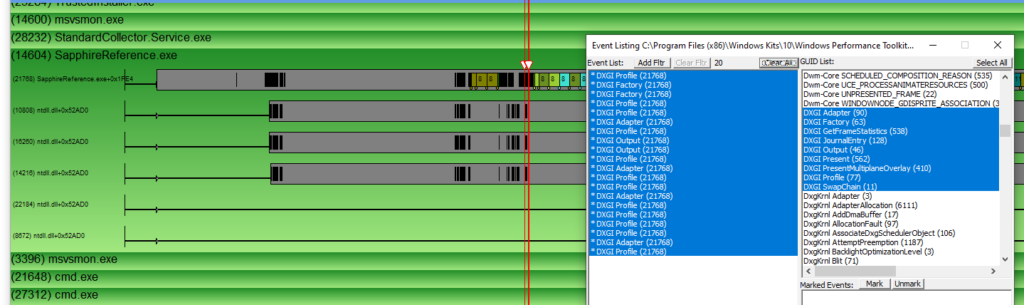
If you would look at the events themselves, they roughly correspond with what we have in the code. If we look at the first event, here’s what we can read.
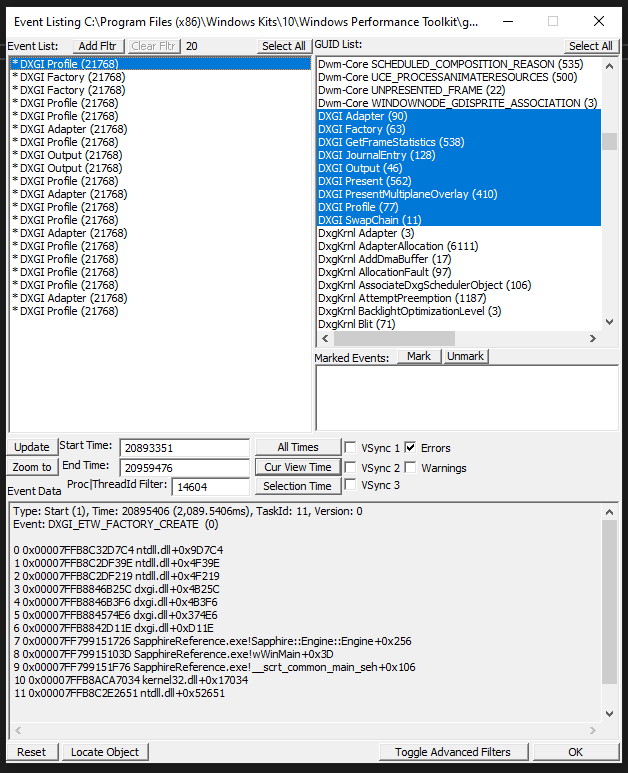
This event is called DXGI Profile. We can see that it is a type of Start(1), meaning that this event represents a start of a process and there should be another event coming of the same name, but with the type End(2). The event itself is of the type DXGI_ETW_FACTORY_CREATE(0), which most probably means that this event is generated when the DXGI Factory starts being created.
You can also see the entire callstack that led to this event. Since I’ve enabled usage of the symbols, we can even see the function names from our code. What you can see here is that our code (SapphireReference.exe), calls functions from the dxgi.dll which in turn calls the functions from the ntdll.dll module. That could be our first iteration of the mental model of the software stack.
The dxgi.dll is the module that is generating the DXGI events that we consume in the GPUView. This is the library that handless all our calls to DXGI. In the future we will see that DirectX also uses this module. The ntdll.dll is a module that exposes Windows Native API. This is the functionality provided by the Windows OS to perform some tasks. We don’t call those functions directly, but the DXGI does. There are many things that this library do, like handling file creation or handling file I/O.
Summary
You can think of this chapter as of a necessary evil. There is a lot of material here that you can really get by without, but I decided to introduce it here, because we will be using those concepts all over the engine.
We’ve learned about the foundation for DirectX programming, which is a Component Object Model paradigm. We’ve learned about the interfaces, classes and differences between COM and C++. We’ve also learnt about the COM object lifetime management and how to release COM objects.
We’ve introduced the concept of DXGI. We’ve used it to enumerate all the hardware available to us. We’ve also retreived some information about that hardware. We’ve also picked the GPU that will be executing our commands.
Finally, we’ve taken a look at the events that DXGI generates, which we can analyze in the GPUView. We’ve seen how they look like in GPUView and what it was actually doing. We’ve also start building a mental model for the software stack that we will be taking advantage of during our journey.
We didn’t add too much things to store, but just to keep things consistent, I’ve updated our model of the things we store in the memory.
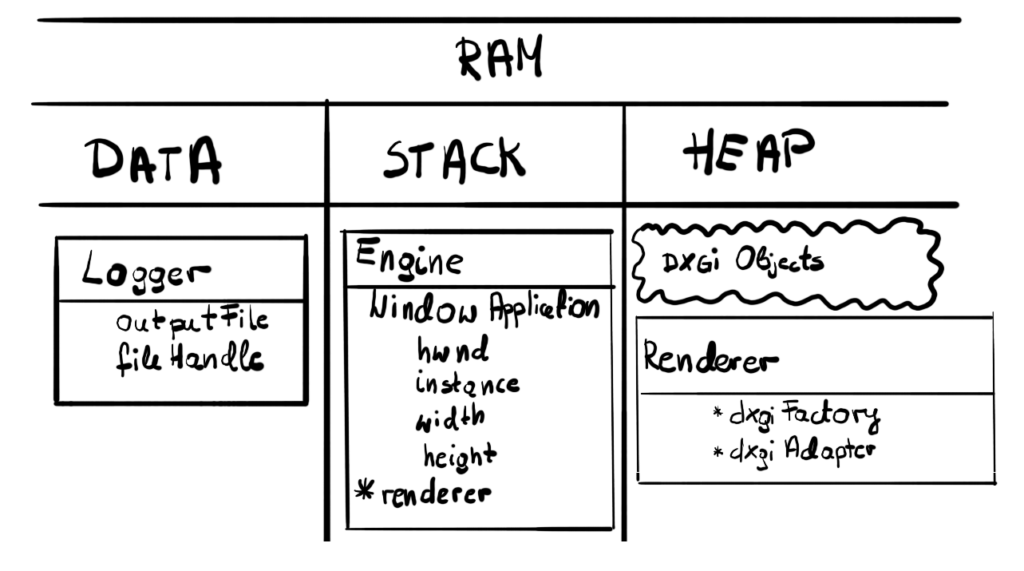
Thanks to DXGI we can now see what kind of hardware we are dealing with. The most important functionality for this chapter is the fact that we’ve picked the adapter that represents the GPU that will do our work for us.
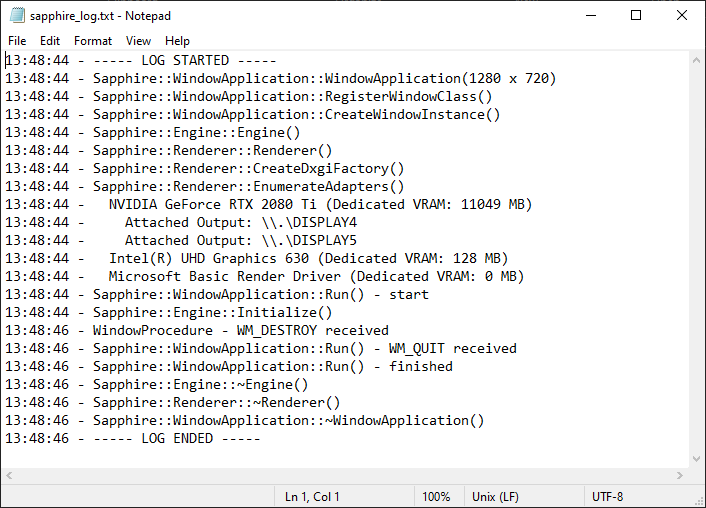
By reading the log we can see that we have two physical GPUs, one dedicated with 12 GB of memory and the other integrated with just 128 MB of its own memory. We can see that in this setup I had two monitors, both plugged to the discrete card. Since the discrete card is first, this is the one that we’ve picked as the GPU that will be producing our frames.
In the next chapter we will create all the necessary structures to create our canvas that we will be drawing our frames. We will create another important DXGI object, which is Swap Chain. It will be responsible for the framework for the continuous frame presentation. Finally, we will create our first DirectX 12 object – the Device.
Source code for this part of the course can be found under chapter “CH03” in this repository here: https://github.com/bboczula/GameEngineCourse.git